About MiXplorer Silver File Manager
MiX Silver is a bundle of MiXplorer file manager and Archiver , Image , Tagger and PDF add-ons as a paid app to support development of MiXplorer. FAQ: https://goo.gl/K9nf2y T
MiX Silver is a bundle of
MiXplorer file manager and
Archiver ,
Image ,
Tagger and
PDF add-ons as a paid app to support development of MiXplorer.
FAQ: https://goo.gl/K9nf2y
Twitter: https://twitter.com/mixplorer
Skins: https://mixplorer.com/skins/
You can modify skin colors in the settings + Skin editor. There are also many theme packages with different icons to download. Tap on them + Import.
The best way indeed is to explore yourself. But here's a brief list of essential features:
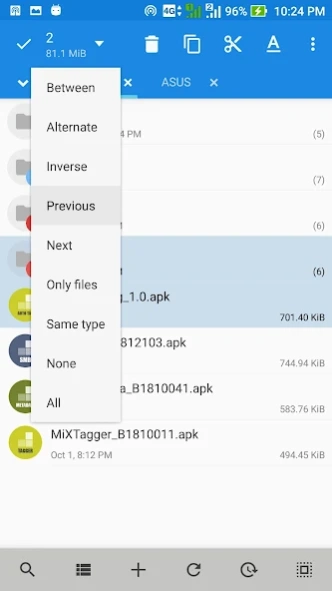
- Easily themable with customization option which lets you select any color you like.
- Sort/disable/enable all menu options and action buttons.
- Unlimited Tabbed browsing and Dual panel in landscape mode and drag & drop between panels also supported.
- Easily create Tasks to multitask Copy, Move and other operations.
- Various view modes and sorting options for each folder.
- Customizable bookmarks drawer with essential file types already categorized.
- Advanced search functions.
- Html viewer.
- Font viewer.
- Export/Import all preferences and bookmarks and customized skins.
- Packing/unpacking 7z and Zip/Zip64 (splitted-encrypted), TAR, TAR.GZ, TAR.BZ2, GZIP, BZIP2, XZ, WIM, Lizard, LZ4, LZ5, Zstandard.
- Unpacking only: AR, ARJ, CAB, CHM, CPIO, CramFS, DMG, EXT, FAT, GPT, HFS, IHEX, ISO, LZH, LZMA, MBR, MSI, NSIS, NTFS, QCOW2, RAR/RAR5, RPM, SquashFS, UDF, UEFI, VDI, VHD, VMDK, XAR and Z.
- All your cloud storage needs accessible from one single app. Choose from these providers:
Mega.nz, Mail.ru, Dropbox, Box, Yandex, HiDrive, Mediafire, 4Sync, 4Shared, Meo, OneDrive, OneDrive Business, pCloud, SugarSync.
+ clouds which support webdav like (Yandex.ru, OwnCloud, MyDrive.ch, DriveHQ, CloudMe, CloudSafe).
- Modifying zip files.
- EPub, MobiPacket and PDF reader add-on.
- Root access for all advanced operations.
- Gocryptfs/EncFS containers are supported for all storages.
- File encryption and decryption using Aescrypt file format.
- FTP(S, ES)/HTTP(S)/WebDav/DLNA servers.
- SAMBA (SMB1, SMB2.0/2.1, SMB3), FTP(S, Es), SFTP, WEBDAV clients are supported as well.
- APK signer with v1, v2, and v3 schemes are supported.
- Image Viewer (it supports GIF, SVG, TGA, ICO).
- Media Player + extra video codecs add-on.
- Text Editor and Code Editor.
- RAW, TIFF and many other image decoders.
And many more awesome features for you to explore!
Previous Versions
Here you can find the changelog of MiXplorer Silver File Manager since it was posted on our website on 2019-06-15 18:41:58.
The latest version is 6.71.15 and it was updated on 2026-10-13 00:26:11. See below the changes in each version.
MiXplorer Silver File Manager version 6.71.15-Silver
Updated At: 2026-09-03
Changes: v6.71.15
• Various fixes, optimizations and improvements.
v6.71.X
• Added Advanced HTTP Server interface.
• Added support for Gocryptfs.
More in changelog...
Tips:
• With GDrive you can only manage files created/uploaded with this app.
• Tap on ADD in bottom toolbar + Storage + Document provider + Find & select your USB or other drives.
• Swipe the bookmark item to the right to delete/edit it.
• The default user for the servers is 'Admin'.
MiXplorer Silver File Manager version 6.71.13-Silver
Updated At: 2026-08-26
Changes: v6.71.13:
• Various fixes, optimizations and improvements.
• Added Advanced HTTP Server interface.
• Added support for Gocryptfs.
More in changelog...
Tips:
• With GDrive you can only manage files created/uploaded with this app.
• Tap on ADD in bottom toolbar + Storage + Document provider + Find & select your USB or other drives.
• Swipe the bookmark item to the right to delete/edit it.
• The default user for the servers is 'Admin'.
MiXplorer Silver File Manager version 6.71.11-Silver
Updated At: 2026-08-16
Changes: •Fixed the FTP server.
•Added Advanced HTTP Server interface.
•Added support for Gocryptfs.
•Added drag-and-drop tab reordering.
•Added AES-GCM support for the SFTP client.
More in changelog...
Tips:
• With GDrive you can only manage files created/uploaded with this app.
• Tap on ADD in bottom toolbar + Storage + Document provider + Find & select your USB or other drives.
• Swipe the bookmark item to the right to delete/edit it.
• The default user for the servers is 'Admin'.
MiXplorer Silver File Manager version 6.71.10-Silver
Updated At: 2026-08-06
Changes: •Fixed Archive dialog crash.
•Added Advanced HTTP Server interface.
•Added support for Gocryptfs.
•Added drag-and-drop tab reordering.
•Added AES-GCM support for the SFTP client.
More in changelog...
Tips:
• With GDrive you can only manage files created/uploaded with this app.
• Tap on ADD in bottom toolbar + Storage + Document provider + Find & select your USB or other drives.
• Swipe the bookmark item to the right to delete/edit it.
• The default user for the servers is 'Admin'.
MiXplorer Silver File Manager version 6.71.2-Silver
Updated At: 2026-07-16
Changes: •Added Advanced HTTP Server interface.
•Added support for Gocryptfs container.
•Optimized SMB (Client/Server) performance.
•Added drag-and-drop tab reordering. Drag tab down slightly to move.
More in changelog...
Tips:
• With GDrive you can only manage files created/uploaded with this app.
• Tap on ADD in bottom toolbar + Storage + Document provider + Find & select your USB or other drives.
• Swipe the bookmark item to the right to delete/edit it.
• The default user for the servers is 'Admin'.
MiXplorer Silver File Manager version 6.70.3-Silver
Updated At: 2026-02-27
Changes: v6.70.3:
• Several minor issues and made some small improvements.
v6.70.1:
• Cast media to Chromecast & DLNA compatible devices.
• XMP/EXIF tag editor.
• SMB server now supports SMBv2 with dialects up to 3.1.1.
Tips:
• With GDrive you can only manage files created/uploaded with this app.
• Tap on ADD in bottom toolbar + Storage + Document provider + Find & select your USB or other drives.
• Swipe the bookmark item to the right to delete/edit it.
• The default user for the servers is 'Admin'.
MiXplorer Silver File Manager version 6.69.2-Silver
Updated At: 2025-12-25
Changes: • Added MiX-Encrypt add-on for EncFS.
• General bug fixes.
Tips:
• With GDrive you can only manage files created/uploaded with this app.
• Tap on ADD in bottom toolbar + Storage + Document provider + Find & select your USB or other drives.
• Swipe the bookmark item to the right to delete/edit it.
• The default user for the servers is 'Admin'.
MiXplorer Silver File Manager version 6.69.0-Silver
Updated At: 2025-12-05
Changes: • Improved compatibility with the latest Android updates.
• Added JXL image support.
Tips:
• With GDrive you can only manage files created/uploaded with this app.
• Tap on ADD in bottom toolbar + Storage + Document provider + Find & select your USB or other drives.
• Swipe the bookmark item to the right to delete/edit it.
• The default user for the servers is 'Admin'.
• Long-press on the items & buttons for more options.
MiXplorer Silver File Manager version 6.68.4-Silver
Updated At: 2024-11-23
Changes: • Changed the startup folder to Home. If you don't like it, go to your favorite folder & open tab bar menu & save the tab.
• Check out Changelog for more...
Tips:
• With GDrive you can only manage files created/uploaded with this app.
• Tap on ADD in bottom toolbar + Storage + Document provider + Find & select your USB or other drives.
• Swipe the bookmark item to the right to delete/edit it.
• The default user for the servers is 'Admin'.
• Long-press on the items & buttons for more options.
MiXplorer Silver File Manager version 6.67.3-Silver
Updated At: 2024-09-24
Changes: • Tap on the title-bar in Player for Playlist.
• Added Headers if Sort+Options+Sections is enabled.
• Added Convert 'Text to PDF'/'PDF to TXT' if it's possible.
...
Tips:
• It only supports free scope of GDrive.
• Tap on ADD in bottom toolbar + Storage + Document provider + Find & select your USB or other drives.
• Swipe the bookmark item to the right to delete or edit it.
• The default user for the servers is 'Admin'.
• Long-press on the items & buttons for more options.